1-Wire DS18B20 Simulator (ESP32)
Flash an ESP32 from the browser and make it answer your controller as a real DS18B20 temperature sensor. Set the temperature with a potentiometer or from this page, and watch the bus counters tell you exactly how far the controller gets.
1. Flash the board
Put the emulator firmware on a spare ESP32-S3 development board. This overwrites whatever is on it. Nothing is installed on your computer — the flashing protocol runs in this tab.
2. Wire it to your controller
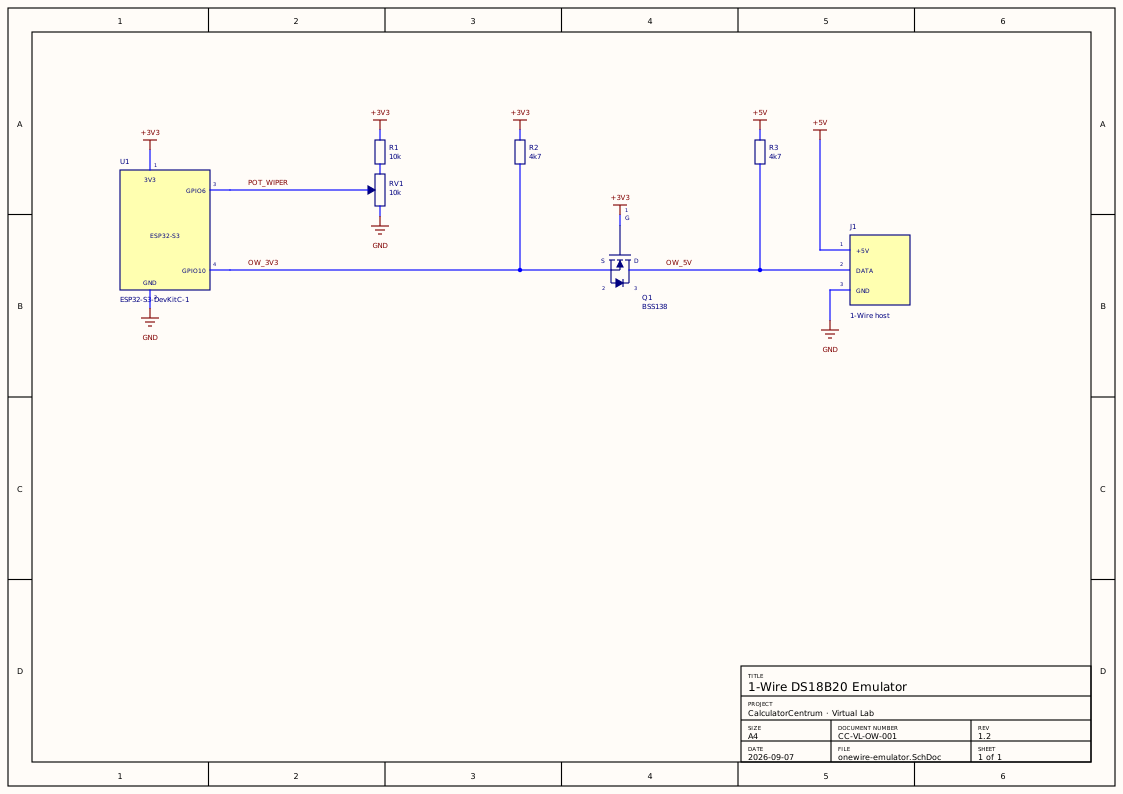
The MOSFET splits the bus into two open-drain segments, so each side needs its own pull-up. Skip Q1 and the 5 V half entirely if your controller's bus is already 3.3 V — then GPIO10 goes straight to the bus, keeping R2.
| Connect | To | Note |
|---|---|---|
| GPIO10 | Controller data line | Through a level shifter if that line is 5 V |
| GPIO6 | Potentiometer wiper | Only needed for potentiometer mode |
| GND | Controller GND | Required — without it the data line means nothing |
| Sensor VDD | Nothing | Parasite power is not supported; the board runs off USB |
3. Connect and configure
Use the USB-UART socket if your board has two. Opening a serial port reboots the board — unavoidably, on every board — and on the socket wired to the chip's own USB that reboot re-enumerates it, killing the connection as it is being made. A separate bridge chip stays connected across the reset, so that socket just works. Either way the reboot drops the emulated sensor off the bus for a moment, and your controller may take a few seconds to find it again.
4. Set the temperature
Turn the knob to one end, type the temperature that end should mean, and press its Capture button. Repeat at the other end. Nothing about the pull-up, the pot's resistance or millivolts matters — both ends are measured from your actual hardware.
Knob is reading – mV
5. What the controller is doing
These counters come from the emulator's own 1-Wire state machine. They are the fastest way to tell the difference between a bus that is not connected, a controller that finds the sensor but will not accept it, and one that is genuinely reading — three situations that look identical from the controller's side, because it just shows nothing.
Not connectedConnect to a board to see bus activity.
Why a fake sensor is useful
Testing anything temperature-driven against a real sensor means changing the sensor's temperature, and that is slow and imprecise: a heat gun overshoots, a freezer takes an hour, and neither lets you sit exactly on an alarm threshold to see which way a comparison falls. A controller cannot tell this apart from the real part, so you can sweep its whole operating range in seconds, park on a boundary, and go back to the same value tomorrow.
What the counters mean
A 1-Wire transaction has a fixed shape, and each counter marks one step further along it. Resets are the controller starting a transaction. Presence is the emulator answering — the pulse that says a device exists. Searches are the controller enumerating the bus to learn the ROM codes on it.Addressed is it selecting this sensor specifically by code. Conversions and reads are it asking for a temperature and collecting the answer.
The value is in where the sequence stops. Searches climbing while addressed stays at zero is the single most common failure, and it means the controller found the sensor and rejected it — nearly always because it only reads ROM codes already in its configuration. No amount of staring at the controller's screen tells you that, because a rejected sensor and an absent one both display nothing.
On timing, if you are porting this
1-Wire is unforgiving in one specific place. After the controller releases the bus at the end of a reset, a slave must wait 15–60 µs and then hold the line low for 60–240 µs, and if the pulse falls outside that window the controller concludes nothing is there. Getting it wrong does not produce an obvious failure: enumeration works, and then the controller quietly declines to read. The emulator reports its measured pulse timing under “show pulse timing” for exactly this reason — the nominal values in the source are not what the hardware does.
Common questions
- Which browsers can flash a board and talk to it?
- Chrome, Edge, Opera and Brave on Windows, macOS, Linux and ChromeOS — anything Chromium-based on a desktop operating system. Both halves of this page use the Web Serial API, which Firefox and Safari have not implemented and which no mobile browser offers at all. There is no polyfill, so on an unsupported browser the tool says so up front rather than failing halfway through a flash. The reference material below works everywhere.
- Why does my controller lose the sensor when I connect from this page?
- Because opening the serial port reboots the board. Both sockets do it — the UART one through the DTR/RTS auto-reset transistors, the native USB one through a chip reset — and there is no way to open a port without it. The reboot drops the emulated sensor off the bus mid-conversation, and your controller has to rescan before it trusts the sensor again, which can take a few seconds. This is worth knowing before you go hunting for a fault: if the reading vanishes the moment you connect here, that is the cause, not a bug in the emulation.
- Do I need a pull-up resistor?
- Yes, unless your controller already has one — which it does if a real DS18B20 has ever worked on that bus. 1-Wire devices only ever pull the line down, and a resistor pulls it back up; with none anywhere the bus never returns to idle. Use 4.7 kΩ, the value the DS18B20 datasheet specifies. Do not rely on the ESP32's internal pull-up: it is around 45 kΩ, far too weak for 1-Wire rise times, and the firmware switches it off on every bus release anyway.
- My controller's bus is 5 V. Can I connect it directly?
- No — the ESP32-S3 is not 5 V tolerant and you will damage the pin. Measure the bus to ground with your controller powered and no sensor attached: if it idles near 3.3 V, connect directly; if it idles near 5 V, put a level shifter in between. One N-channel MOSFET in the standard open-drain arrangement is all 1-Wire needs, and the wiring diagram above shows it. The cheap four-channel BSS138 level-converter boards are exactly this circuit — use one channel, and add a 4.7 kΩ on the low side because their onboard 10 kΩ makes the rising edge about twice as slow.
- The counters show searches but no matches. What does that mean?
- Your controller is finding the sensor and then declining to talk to it. By far the most common reason is that it only reads ROM codes already in its configuration, so a freshly-invented address is discovered and ignored. Set the address on this page to the one your controller expects — if you still have the real sensor, its code is usually printed in the controller's own sensor list. This is exactly the case the counters exist to make visible: from the controller's side it looks identical to a sensor that is not there at all.
- Can it emulate a parasite-powered sensor?
- No, and it reports itself honestly as externally powered when the controller asks (
Read Power Supply, 0xB4). A parasite-powered DS18B20 draws its energy from the data line through an internal diode and capacitor, which an ESP32 cannot do — it needs its own supply, and it has one over USB. If your controller is configured for parasite mode it will apply a strong pull-up during conversions; that is harmless here, because the emulator never drives the bus during the conversion window. Leave the sensor's VDD pin unconnected and give the two boards a common ground. - How faithful is the emulation?
- Faithful on the wire, not in time or physics. The ROM code and its CRC, the presence pulse, the search algorithm, the scratchpad layout and its CRC, and the 1/16 °C fixed-point encoding are all exactly what a real DS18B20 produces, so a controller that works with the real part works with this. What is not modelled is the conversion delay — the emulator answers immediately rather than taking up to 750 ms — along with self-heating, noise, drift and response lag. For testing a driver or an alarm threshold that covers nearly everything; for testing how your product behaves when a sensor is slow or failing, it does not.
- Why only the ESP32-S3?
- Because the timing had to be measured on real hardware rather than assumed. The library's bus timing is scaled by a constant expressing CPU cycles per wait-loop iteration, which differs per chip and per clock speed, and a wrong value produces a board that enumerates and then fails to answer — miserable to diagnose. The firmware repository carries a calibration sketch that measures it without needing any 1-Wire master, so adding a chip is a measurement and a config entry rather than a rewrite. Only ESP32-S3 has actually been measured and tested, so only that is offered here.
- Is it safe to flash a board I am using for something else?
- It overwrites the application, so treat it as destructive. The flash writes a complete image — bootloader, partition table and application — over whatever was there, with no backup step. Nothing is harmed permanently: re-flashing your own firmware restores the board, and the emulator does not touch eFuses or anything else irreversible. But a board you are mid-project with should not be the one you experiment on. Any spare ESP32-S3 development board will do.
- Does anything I do here get uploaded?
- No. There is no server and no account. The page is static, the firmware is a plain 199 kB file served from this site, and the flashing protocol and the serial conversation with your board both run in JavaScript in your tab. The temperatures you set, the counters and your board's serial number never leave your machine. You can confirm it: load the page, disconnect from the internet, and everything except the initial firmware download still works.